
📱✨
An iPad is a flat screen you can touch! You tap it with your finger. 👆
You can watch shows, draw pictures, and play games on it! 🎨
It is like a magic window you carry around. 🪟😄
What Is an iPad?
An iPad is a thin, flat computer made by Apple. It has a big glass screen that you touch with your fingers.
What Can You Do on an iPad?
You can draw with your finger or an Apple Pencil, watch videos, read books, play games, and video call your grandparents.
How Does the Screen Know Where You Touch?
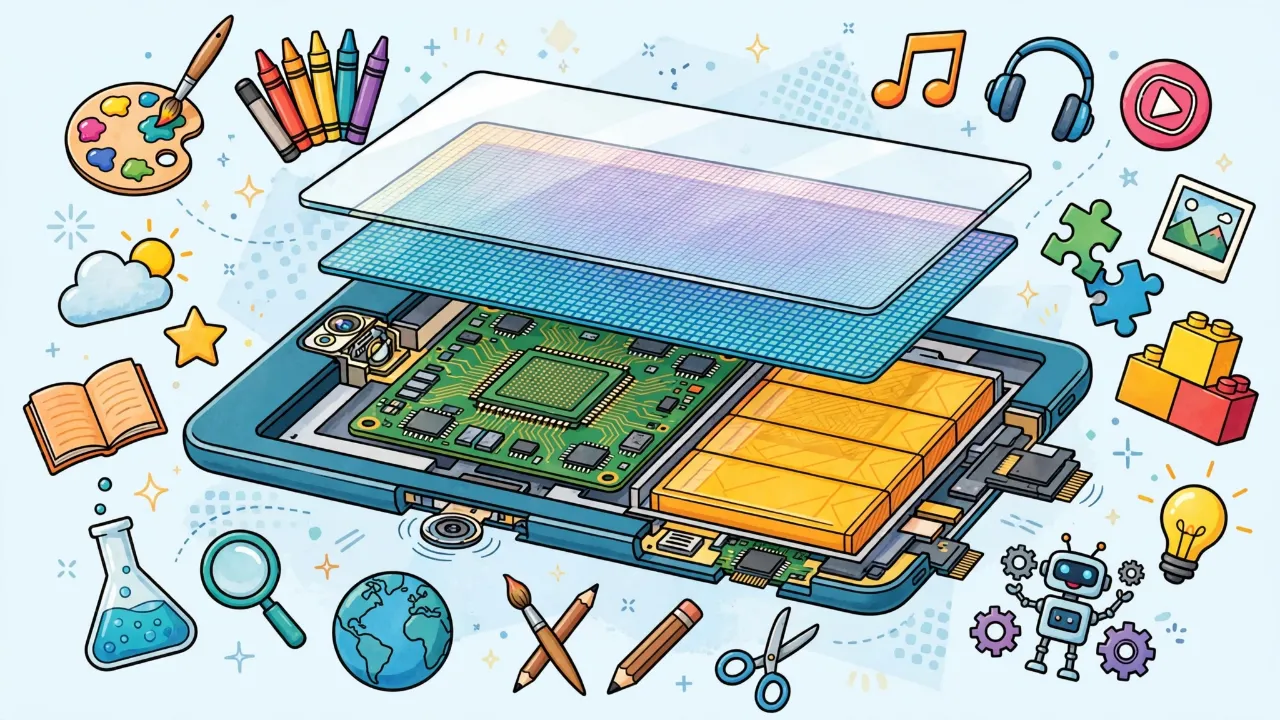
Under the glass is a special layer. Your finger has a tiny bit of electricity in it. The screen feels that electricity and knows where your finger is. That is why it does not work with thick gloves.
Before iPads
Before iPads, computers were big and heavy. In 2010, Steve Jobs showed the world the first iPad, something between a phone and a laptop. Now millions of people use tablets every day. 🌍
The Birth of the iPad
On January 27, 2010, Apple co-founder Steve Jobs walked onto a stage in San Francisco and sat down on a couch with a thin, flat device. "What this device does is extraordinary," he said. That device was the first iPad.
Many people were skeptical at first. "It's just a big iPhone!" critics said. But Apple sold 3 million iPads in the first 80 days. It turned out people really did want a device bigger than a phone but simpler than a laptop.
How Does a Touchscreen Work?
The iPad uses a capacitive touchscreen. Here's how it works:
- The screen has a grid of tiny electrical sensors underneath the glass
- Your body naturally carries a small electrical charge
- When your finger touches the glass, it changes the electrical field at that point
- The iPad measures exactly where the change happened and responds
iPad Through the Years
Apple has made many different iPads since 2010:
- iPad (original, 2010): 9.7-inch screen, no camera, 0.5 pounds. Cost $499.
- iPad mini (2012): A smaller, lighter version perfect for reading and travel
- iPad Air (2013): Much thinner and lighter than the original
- iPad Pro (2015): Bigger screen, faster processor, designed for artists and professionals
- Apple Pencil (2015): A special stylus that makes drawing on the iPad feel like drawing on paper
iPads in Schools
Today, millions of students around the world use iPads in class. Teachers use them for interactive textbooks, math apps, science simulations, and creative projects. Some schools give every student their own iPad. In 2023, Apple estimated that over 40 million iPads were being used in education worldwide.
What Makes iPads Special?
The iPad was not the first tablet computer, but it was the first one that was easy and fun enough for everyone to use. Before the iPad, tablets ran desktop operating systems and needed a stylus to tap tiny buttons. Apple designed a completely new touch-friendly interface that even a toddler could figure out. That simplicity changed everything.
The Tablet That Almost Didn't Happen
The iPad's origin story is counterintuitive: Apple developed tablet technology before the iPhone. In 2003-2004, Apple engineers were experimenting with multi-touch displays for a tablet project. Steve Jobs looked at the prototype and realized the technology would work better as a phone first. The tablet project was shelved, the iPhone launched in 2007, and the iPad followed three years later using the refined mobile operating system.
This sequence matters because it explains a key design decision: the iPad runs iOS (later iPadOS), a mobile-first operating system, not a desktop OS. Microsoft had been shipping tablet PCs since 2002, but they ran full Windows with a stylus-dependent interface. They were laptops without keyboards. Apple's insight was that a tablet needed its own interaction paradigm, not a shrunken desktop.
Inside the Hardware
Modern iPads contain remarkable engineering in a package under 7mm thick:
Display technology: The iPad Pro uses a Liquid Retina XDR display with mini-LED backlighting. Instead of one big backlight behind the screen, it uses over 10,000 tiny LEDs arranged in 2,596 local dimming zones. This allows parts of the screen to be completely dark while other parts are bright, creating a contrast ratio of 1,000,000:1.
Battery engineering: iPad batteries are lithium-polymer cells that store energy in a chemical reaction between lithium ions and a cobalt oxide cathode. The challenge is fitting enough battery capacity for 10 hours of use into a device that weighs about a pound.
A typical iPad battery holds about 28.6 watt-hours (Wh) of energy.
The battery weighs approximately 200 grams.
Energy density = 28.6 Wh ÷ 0.2 kg = 143 Wh/kg
For comparison, a AA battery has about 4 Wh/kg. The iPad battery stores 35x more energy per kilogram!
The App Economy
The iPad created an entirely new software market. Before tablets, software was sold in boxes at stores for $30-$300. The App Store introduced $0.99-$9.99 price points and free-to-download models. As of 2025, the App Store hosts over 1.8 million iPad-specific apps, and Apple has paid developers over $320 billion total since the store's 2008 launch (including iPhone apps).
This price compression had consequences. Independent developers found it nearly impossible to sustain businesses at $0.99 per sale, leading to the free-with-in-app-purchases model that dominates today. The economics of "free" apps are supported by advertising (user attention as product) or subscription revenue (recurring payments for ongoing access).
iPads and the "Laptop Replacement" Debate
Apple has positioned the iPad Pro as a laptop replacement since 2015, when Tim Cook asked, "Why would you buy a PC anymore?" The argument: iPad Pros have laptop-class processors, keyboard accessories, trackpad support, and desktop-grade apps. The counterargument: iPadOS still lacks key productivity features like proper file management, multi-window workflows, and the ability to run professional desktop software (full Photoshop, development environments, etc.).
The usage data tells a clear story: most people use iPads primarily for content consumption (video, reading, browsing), not content creation. An estimated 80% of iPad usage time is passive consumption. This is not a failure; it is a different product category than a laptop, regardless of how Apple markets it.
The iPad as Platform Strategy
The iPad is best understood not as a product but as a platform extension. Apple's business model depends on ecosystem lock-in: once a user owns an iPhone, adding an iPad, Apple Watch, Mac, and AirPods creates switching costs that compound with each additional device. The iPad occupies a specific niche in this ecosystem: the screen you use at home when the phone feels too small and the laptop feels like too much work.
This positioning explains Apple's historically ambivalent treatment of the iPad's software capabilities. Making iPadOS too powerful would cannibalize Mac sales (higher margin). Making it too limited would cede the market to Android tablets (Samsung, Lenovo) or hybrid laptops (Microsoft Surface). Apple has threaded this needle by adding laptop-like features (Stage Manager, desktop-class Safari, developer tools) at a pace slow enough to protect Mac revenue.
Capacitive Touch: The Enabling Technology
The iPad's capacitive touchscreen descends from work by E.A. Johnson at the Royal Radar Establishment (UK, 1965) and the multi-touch research of Wayne Westerman at the University of Delaware (1999, later acquired by Apple in 2005 via FingerWorks). The physics is straightforward:
C = ε₀ · εr · A / d
where ε₀ = 8.854 × 10⁻¹² F/m, εr = dielectric constant of the glass, A = overlap area, d = gap between conductor layers
The iPad Pro's 120Hz ProMotion display doubles the touch sampling rate to 240Hz for Apple Pencil input, reducing latency to approximately 9 milliseconds. This is below the threshold of human perception (~15-20ms for direct manipulation tasks), which is why drawing on the iPad Pro feels like drawing on paper.
The Education Market and Digital Equity
Apple's education iPad strategy reveals tensions between corporate objectives and public good. The base iPad ($329-$449) is positioned as an education device, and Apple offers institutional discounts. However, the true cost of an iPad education deployment includes device management software (Jamf, Mosyle), replacement insurance, app licenses, charging infrastructure, and IT support. Total cost of ownership over a 4-year device lifecycle ranges from $800-$1,500 per student.
The digital equity question: iPad deployments in well-funded suburban districts create a technology gap with under-resourced districts that cannot afford them. The Los Angeles Unified School District's 2013 iPad initiative ($1.3 billion for 650,000 iPads) collapsed due to inadequate infrastructure, software problems, and students bypassing device management within a week of deployment. The failure demonstrated that hardware is the easy part; curriculum integration, teacher training, and content quality are harder and more expensive.
Environmental Cost
An iPad's environmental footprint is dominated by manufacturing (83% of lifecycle emissions), not usage. Apple reports 53 kg CO₂e for a 10th-generation iPad. The supply chain spans: cobalt mining (Democratic Republic of Congo), lithium extraction (Chile/Australia), rare earth processing (China), chip fabrication (TSMC, Taiwan), assembly (Foxconn, China), and global distribution. Apple's recycling robot "Daisy" can disassemble 200 iPhones per hour, but no equivalent system exists for iPads, and tablet recycling rates remain below 20%.
The planned obsolescence question: Apple supports iPads with software updates for approximately 5-7 years, longer than most Android tablets (2-3 years). However, the base iPad's storage tiers (64GB/256GB) fill quickly, and battery degradation typically reduces usable capacity to ~80% by year 3-4, creating practical incentives to replace functional devices.
Sources
- Isaacson, W. Steve Jobs. Simon & Schuster (2011).
- Apple Inc. "iPad Environmental Report" (2024).
- Westerman, W. "Hand Tracking, Finger Identification, and Chordic Manipulation on a Multi-Touch Surface." PhD dissertation, University of Delaware (1999).
- Blumenfeld, P.C. et al. "Motivating Project-Based Learning." Educational Psychologist 26(3-4), 369-398 (1991).
- Warschauer, M. "Going One-to-One." Educational Leadership 63(4), 34-38 (2005).
- LAUSD Office of the Inspector General. "Review of the iPad Program." Report (2014).
Why Your Kid Asked About iPads
If your child requested an article about iPads, there is a reasonable chance this is a soft campaign for more screen time, a new iPad, or both. That is fine. The device they are using to read this article is, itself, an iPad (or something similar), which makes the meta-recursion here worth appreciating.
The Screen Time Research
The honest summary of the screen time literature: it depends. The American Academy of Pediatrics moved away from specific hour limits in 2016, replacing them with a "Family Media Plan" approach. The research shows:
- Passive consumption (watching YouTube, scrolling TikTok) is associated with negative outcomes at high doses: reduced sleep quality, decreased physical activity, and correlations with anxiety and depression in adolescents. However, establishing causation (screens cause harm vs. kids who are struggling use screens more) remains methodologically challenging.
- Active creation (drawing, coding, music production, writing) shows neutral or positive associations. A child using an iPad to create a stop-motion animation is qualitatively different from a child binge-watching unboxing videos.
- Social use (video calls with family, collaborative games) is generally positive, particularly for children with limited in-person social access.
The practical implication: "How much iPad?" is the wrong question. "What is my child doing on the iPad?" is better. "Is the iPad displacing sleep, exercise, or face-to-face interaction?" is best.
Which iPad to Buy (If You Are Shopping)
Apple's iPad lineup is deliberately confusing, likely to push buyers toward higher-margin models. As of 2026, the decision tree is simple:
- Kids 3-8 (media consumption, educational apps): Base iPad, 10th generation ($329). Put it in an OtterBox or similar rugged case. Do not buy the 64GB model; it will fill up in 6 months. Get 256GB.
- Kids 8-14 (schoolwork, drawing, games): iPad Air ($599). Apple Pencil support is meaningfully better than the base model. The M2 chip will remain performant for 5+ years.
- Teenagers doing creative work: iPad Pro only if they are genuinely doing video editing, digital illustration, or music production. Otherwise, the Air is sufficient and $400 cheaper.
One non-obvious recommendation: buy refurbished. Apple's Certified Refurbished store sells previous-generation iPads at 15-20% discount with full warranty. A refurbished iPad Air is almost always a better value than a new base iPad.
Parental Controls That Actually Work
Apple's Screen Time feature set is reasonably robust if configured properly:
- Downtime: Schedule iPad-off hours (e.g., 8pm-7am). Apps are grayed out during downtime. The child can request more time, and you approve or deny from your own device.
- App Limits: Set daily time limits per app category (e.g., 1 hour for Games, 30 minutes for Social Media). This is more effective than a total screen time limit because it targets consumption patterns.
- Content Restrictions: Filter web content, disable in-app purchases (do this immediately), restrict explicit content in Apple Music and Podcasts.
- Communication Limits: Control who the child can contact during allowed and downtime hours.
The limitation: a technically literate child over 10 can usually bypass Screen Time restrictions through various workarounds (iMessage web links, Settings date manipulation, screen recording). No technical control fully substitutes for a conversation about responsible use.
Sources
- American Academy of Pediatrics. "Media and Young Minds." Pediatrics 138(5) (2016).
- Przybylski, A.K. and Weinstein, N. "A Large-Scale Test of the Goldilocks Hypothesis." Psychological Science 28(2), 204-215 (2017).
- Orben, A. and Przybylski, A.K. "The association between adolescent well-being and digital technology use." Nature Human Behaviour 3, 173-182 (2019).
- Isaacson, W. Steve Jobs. Simon & Schuster (2011).
- Apple Inc. "Use parental controls on your child's iPhone and iPad." Apple Support (2025).